

Yolla review: International call pricing, US$3 call credit and usage restrictions
An analysis of Yolla's internet call pricing, US$3 referral credit, account and refund restrictions, and the details Hong Kong users should check.
Last updated 14 October 2026

Best for
People who need to call overseas mobile or landline numbers using data or Wi-Fi and are willing to compare destination rates first.
Yolla can serve as an internet calling tool for reaching conventional overseas telephone numbers; the actual cost depends on the destination, number type, top-up method and whether the recipient uses a mobile or landline. Referral credit is a calling balance, not cash. New users must first complete a qualifying payment; the official frequently asked questions state that a top-up of US$4 or more counts towards a referral. Check the actual rates before deciding whether to top up; do not buy a calling balance you will not use solely for the US$3 credit.
Pros
- Can call overseas mobile and landline numbers
- Available in Hong Kong app stores
- Referral credit can offset call charges
- The same account can be used across different devices
- The person you call does not need Yolla, because calls go to their ordinary phone number
Watch-outs
- Per-minute rates vary by destination and number type
- A paid top-up is required first, and the US$3 credit cannot be withdrawn
- Switching between Wi-Fi and mobile data during referral registration may affect tracking
- The current in-app terms govern purchases and refunds
- Calls over mobile data use the data allowance of your own mobile plan
Current related offer
Yolla offer pageAd / referral links — we may earn a bonus when you sign up.
Provider
Yolla
Use the invitation link on this page and code A7T8I9 to install Yolla and register as a new user. Yolla provides low-cost calls to mobile and landline numbers worldwide over Wi-Fi or mobile data. Its official Free Credits page states that invited users receive US$3 in call credit after their first Yolla payment; its FAQ states that only top-ups of US$4 or more count towards a referral. If the code is not applied automatically on the payment screen, enter A7T8I9 in the app menu's Get bonus / Bonus (promotions) section before topping up. Check the destination rate, payment currency and amount payable in the app before paying.
Requirement: First Yolla payment; according to Yolla's FAQ, only top-ups of US$4 or more count towards a referral
EasyAllow about 5 minutes to install the app and complete your first top-upPayout US$3 in call credit is added to your Yolla balance as soon as your first qualifying payment is completed, subject to Yolla's referral terms
Verified 14 October 2026
Full claim instructions are on the Yolla offer page.
How the service works
Yolla is a calling application that uses an internet connection to call overseas mobile and landline numbers. It is not a standard local monthly mobile network plan; calling requires Wi-Fi or mobile data, and your internet provider charges for mobile data according to your plan.
It suits people who call conventional overseas numbers occasionally or regularly. If the other person can also use a free internet messaging and calling application, first compare alternatives that both parties can use.
How call rates are calculated
Yolla's rates vary by call destination and whether the number is a mobile or landline. Before topping up, enter the full number in the application to check the rate, and look for any connection fees, minimum charges or rounding rules; a single global rate cannot be used to estimate costs.
Hong Kong users should refer to the payment page for the actual currency charged and the in-app price. App store purchases and website top-ups may show different prices; check the amount payable and the balance before paying.
US$3 referral credit
After you register using the Yolla invitation link on this page and code A7T8I9, the official Free Credits page states that new users receive US$3 in call credit after their first payment. Yolla's frequently asked questions state that only top-ups of US$4 or more count towards a referral. The credit is for Yolla calls only and cannot be redeemed for cash or transferred.
Open the invitation link directly from this page on your phone, and complete installation and registration using the same network connection. If the code is not applied automatically on the payment screen, enter it in the application's Get bonus/Bonus section. The referral programme may have limits or be withdrawn; keep your payment and registration confirmations.
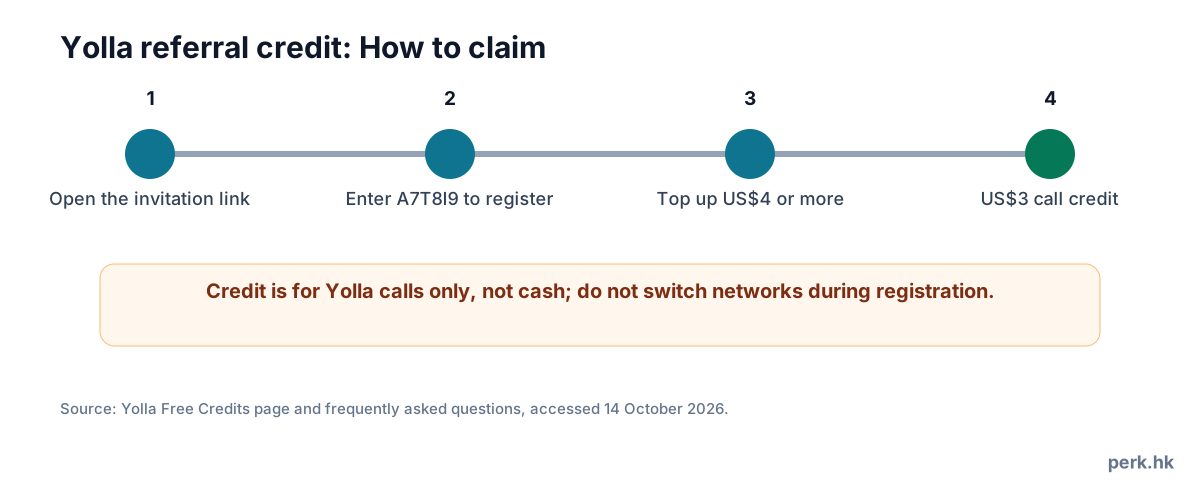
Getting started and referral tracking
Open the invitation link on your phone, install the application and register immediately. Yolla advises users not to switch between Wi-Fi and mobile data during registration, as referral tracking may otherwise fail. Users should also stay on the same phone and continue the same browsing process until registration is complete.
Before topping up, confirm that the invitation code is still shown in your account or on the payment screen. If the invitation does not appear, provide the invitation, registration and payment times when contacting Yolla customer support; the provider decides whether to issue a referral reward retrospectively.
Balance, payments and refunds
US$3 is an in-app calling balance, not a bank deposit, cash or a transferable asset. After a paid top-up, first read the payment confirmation page and terms to understand cancellation, refunds, balance expiry and how customer support handles these matters. In-app purchases on different platforms may also be subject to the platforms' refund procedures.
Do not treat an unused balance as a cash reward already received; if you only need to make one or two short calls, calculate the top-up amount required using the destination rate to avoid leaving a balance you cannot use up.
Application ratings
Yolla is available in Hong Kong app stores. Store ratings change over time and reflect the overall application experience; they cannot establish the audio quality, connection success rate or customer service performance of an individual international calling route.
Before calling, use a small amount of credit to test destinations you call frequently, and make calls in a quiet setting with a stable internet connection. If call quality is inconsistent, check your network connection first, then contact official support.
Who it suits and who it does not
Suitable for: People who need to call conventional overseas telephone numbers and can control costs at the rates shown by Yolla. The US$3 credit can be used for an initial trial, but your choice should be based on ongoing rates and your actual calling patterns.
Unsuitable for: People who mainly contact friends and family who also use free internet messaging and calling applications, need a local monthly SIM service, or are unwilling to pay for a top-up first.
FAQ
- What is Yolla's invitation code?
- A7T8I9. First open the invitation link on this page using your phone, then install and register; if the system does not apply it automatically, enter the code in the application.
- Can the US$3 be withdrawn?
- No. It is Yolla call credit, not cash, and cannot be transferred.
- How much must I top up to qualify for the referral?
- Yolla's frequently asked questions state that a top-up of US$4 or more counts towards a referral; check the application's current terms before paying.
- Can Yolla call mobile and landline numbers?
- Official information states that overseas mobile and landline numbers can be called; check the specific destination and per-minute rate in the application.
- Why was the invitation not tracked?
- The official frequently asked questions advise users to install through the invitation link on their phone and register promptly, without switching between Wi-Fi and mobile data.
- Is Yolla suitable for use in Hong Kong?
- The application is available in Hong Kong stores and supports overseas calls; data charges, payment currency and destination rates depend on your network and what the application displays.