

Wispr Flow Review: AI Dictation Pricing, Cantonese Support, Privacy Settings and the 30-Day Pro Trial for Hong Kong Users
A Wispr Flow review written for Hong Kong users: how the product works, the Free plan's weekly word limits, Pro pricing on the Hong Kong App Store, how Cantonese and mixed Chinese-English dictation perform, data handling and privacy settings, and the 30-day Pro trial available with referral code JIMMY146.
Last updated 24 October 2026

Best for
Working professionals and students in Hong Kong who write large volumes of email, reports and messages on a computer or phone each day, particularly those who would prefer to dictate, or who need to type less because of strain.
Wispr Flow is a voice-input tool built on cloud transcription. It enters tidied text directly into any application on Mac, Windows, iPhone and Android, supports more than 100 languages and offers a separate Cantonese option. The Free plan allows 2,000 words a week on a computer before slowing down, which a heavy writer will exhaust within days; Pro costs HK$118 a month or HK$1,130 a year on the Hong Kong App Store. Signing up with referral code JIMMY146 extends the standard 14-day Pro trial to 30 days, which is sufficient for an assessment based on real work. Note that each dictation is recognised as a single language, so sentences mixing Chinese and English may be transcribed inaccurately. Adjust the data settings first, test with everyday messages, and pay only if the tool is still in daily use in the fourth week.
Pros
- A 30-day Pro trial on sign-up with referral code JIMMY146, against a standard 14 days
- A separate Cantonese option, with Traditional Chinese output available
- Enters text directly into any application on Mac, Windows, iPhone and Android
- A Free plan remains after the trial: 2,000 words a week on a computer, with no time limit
- Model training on user data can be switched off; SOC 2 Type II and ISO 27001 certified
- Rated 4.8 on the Hong Kong App Store (122 ratings)
Watch-outs
- Transcription always takes place in the cloud; there is no offline mode
- Each dictation is recognised as one language, so English words may be rendered in Chinese characters when mixed
- Pro costs HK$118 a month or HK$1,130 a year on the Hong Kong App Store
- The Free plan slows beyond 2,000 computer words a week and stops at 5,000 until the weekly reset
- The iPhone keyboard requires Full Access and switches to the Flow app to record
- No support for Linux, iPad or Windows on Arm, and no published general refund policy
Current related offer
Wispr Flow offer pageAd / referral links — we may earn a bonus when you sign up.
Provider
Wispr Flow
Sign up for Wispr Flow through referral code JIMMY146 and get a 30-day Pro trial, normally double its standard 14-day trial. The trial is granted at sign-up, with no word count to reach first.
Requirement: The 30-day Pro trial is applied at sign-up.
Easy5-10 minutesPayout 30-day Pro trial starts at referred sign-up
Verified 24 October 2026
Full claim instructions are on the Wispr Flow offer page.
Product overview and how it works
Wispr Flow is developed by Wispr AI, Inc. and operates as a system-wide voice-input tool rather than within a single program. The user holds a shortcut, or enables hands-free mode, and dictates; the text is entered at the cursor, including in Outlook, Gmail, WhatsApp, Slack, Google Docs and ChatGPT. The system removes fillers such as "um" and "er", applies corrections made mid-sentence ("five o'clock, no, six" produces only six o'clock) and allows names and specialist terms to be added to a personal dictionary.
Flow supports Mac, Windows, iPhone (as a keyboard) and Android (as a floating Flow Bubble). Mac and Windows also include a meeting Notetaker, which records on the device itself without a bot joining the meeting. All dictation is transcribed in Wispr's cloud, so an internet connection is required and the tool cannot be used offline.
The trial arrangements for referral code JIMMY146
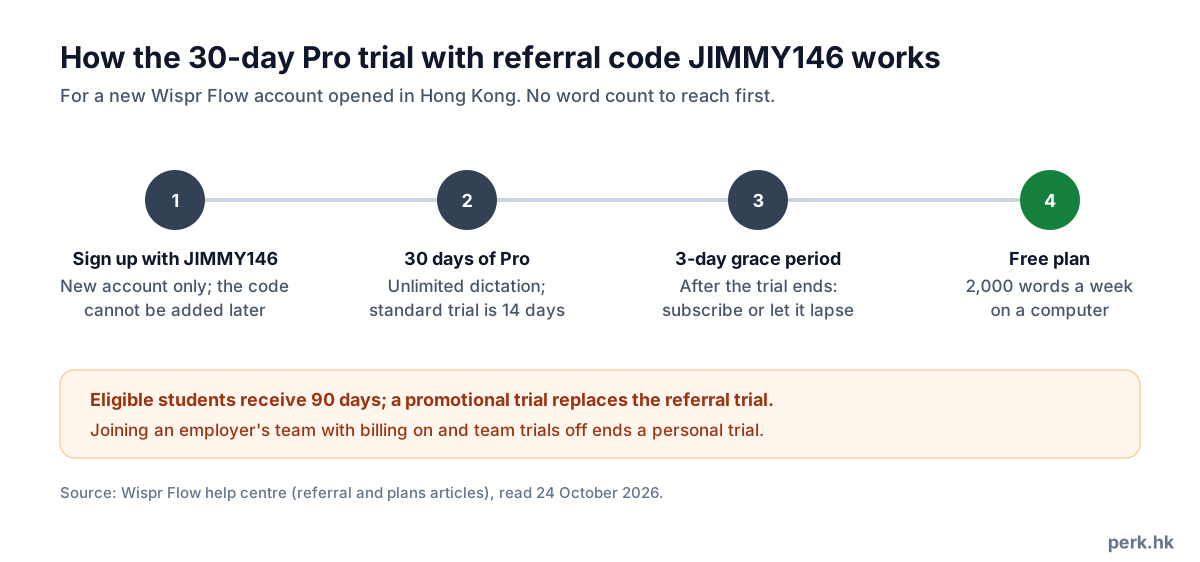
Opening a new account through the referral link, or entering referral code JIMMY146 at sign-up, gives a 30-day Pro trial instead of the standard 14 days, with no word count to reach first. Each account may have only one referrer, set when the account is opened and not changeable afterwards, so the code must be entered at sign-up.
The trial is affected in the following cases: a promotional trial replaces the referral trial; eligible students receive 90 days; and accounts on the free Student plan have no trial. In addition, if an organisation's Wispr team has live billing with team trials switched off, accepting the team invitation ends the personal trial immediately and billing begins, so it is advisable to join only after the trial has ended.
Wispr's help centre does not require a payment card for the referral trial; if a checkout screen appears, proceed only after confirming that nothing is payable that day. Disclosure: JIMMY146 is this site's referral code; once your account qualifies (2,000 words dictated in total, or a personal plan that is active or on trial), this site receives one month of Pro credit.
The difference between Free and Pro
The Free plan allows dictation in any application and in every supported language, with the personal dictionary and snippets; its only restriction is volume. On Mac or Windows the weekly allowance is 2,000 words, beyond which dictation slows, and the maximum is 5,000 words, at which point it stops until the reset at midnight on Sunday, US Pacific time: 3pm on Sunday in Hong Kong during US daylight saving time, or 4pm otherwise. On iPhone the allowance is 550 words with a 750 maximum; on Android it is 1,000 words with a 1,500 maximum, resetting at 7.45am on Monday, Hong Kong time.
Pro removes the word limits, raises the Notetaker's meeting allowance and history, and provides priority support, early access to new features and team functions such as a shared dictionary, snippets and centralised billing. The Growth plan, at US$23 or US$33 per user a month (US list prices), adds single sign-on, per-user reports and HIPAA controls under a signed agreement, and is intended mainly for organisations.
Pricing in Hong Kong
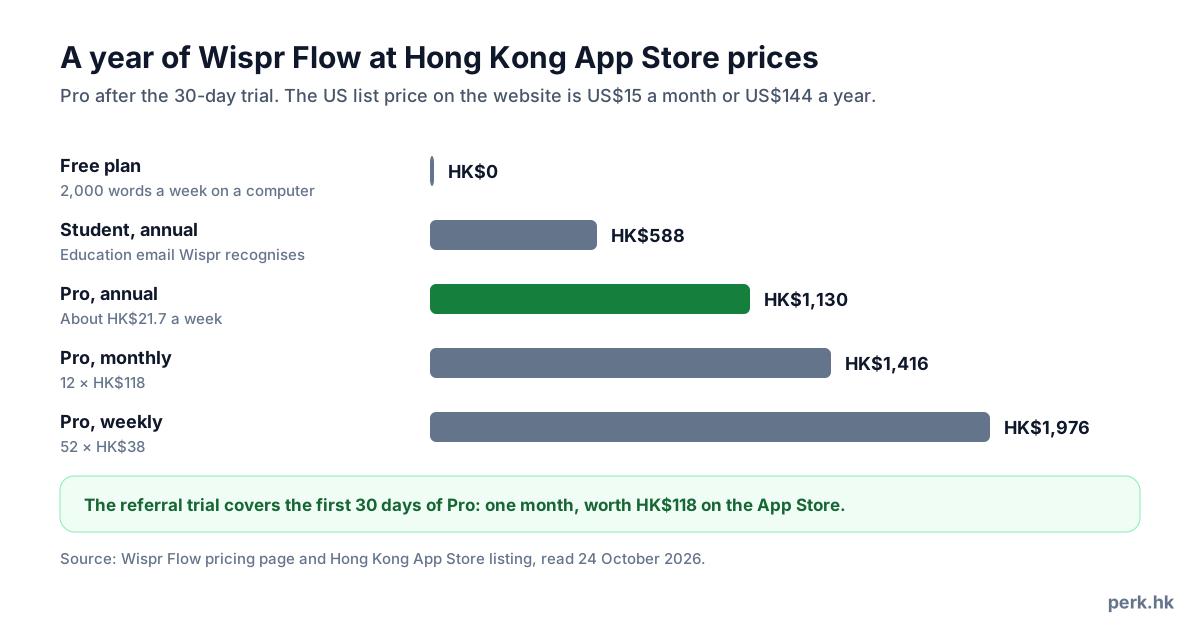
On the Hong Kong App Store, Pro costs HK$118 a month, HK$1,130 a year or HK$38 a week, and the student plans HK$58 a month or HK$588 a year. Wispr's website sets fixed local prices in 24 currencies according to where the user connects from rather than the billing address; using a VPN may cause prices to be shown in US dollars. The US list price is US$15 a month or US$144 a year, annual billing is presented as a 20% saving, and existing subscribers retain their original price.
The payment route determines the cancellation route: the Stripe billing portal for the desktop app, Apple's subscription settings on iPhone, and the Play Store on Android. Students and educators receive 50% off Pro with an education email recognised by Wispr; the help centre refers to .edu addresses, and those not accepted see the message "Student plans only available for .edu email addresses".
Cost analysis
The referral trial is equivalent to one month of Pro, worth HK$118 at the Hong Kong App Store price, and is 16 days longer than the standard trial. Its real value depends on whether Pro is kept afterwards: twelve monthly payments total HK$1,416, while annual billing costs HK$1,130, a saving of HK$286, or about HK$21.7 a week; paying weekly for a year would reach HK$1,976.
A user writing about 1,200 words of email and reports each working day, some 6,000 words a week, would find the Free plan slowing by midweek and reaching the 5,000-word maximum before the weekend, and would therefore need to consider Pro; the trial is the opportunity to judge whether HK$1,130 a year is justified. A user dictating fewer than 2,000 words a week is adequately served by the Free plan and need not pay.
Performance with Cantonese and mixed Chinese-English
Wispr lists Cantonese as a separate language option that can be selected together with Simplified or Traditional Chinese; however, when Chinese is detected the default output is Simplified characters, so Hong Kong users should select "Chinese - Traditional" in settings. Wispr does not state whether Cantonese dictation produces colloquial characters or standard written Chinese, so it is advisable to test with everyday messages first.
More significantly, Flow recognises one language per dictation rather than word by word; with both Chinese and English selected, English words may be written in Chinese characters, and vice versa. Users who habitually mix the two languages should configure them by task: select only English when writing English email, and only Traditional Chinese and Cantonese when writing Chinese messages. Users on the Hong Kong App Store have also reported that Chinese punctuation is less satisfactory.
Privacy and data handling
Because transcription always takes place in the cloud, the scope of data retained is set under Settings, then Data and Privacy. The first control is the model-training switch (formerly Privacy Mode): when on, audio, transcripts and edits may be used to train AI models. The second is Dictation Cloud Storage, which determines whether transcripts, audio and dictation history are stored on Wispr's servers for access across devices. Users dictating sensitive content should switch both off. Whatever the settings, Wispr still collects usage statistics such as word counts, and when a user gives a thumbs up or down, the audio and text of that session are submitted and may be reviewed by staff.
Wispr states that data is encrypted in transit and at rest, that it holds SOC 2 Type II and ISO 27001 certification, that it has zero-data-retention agreements with the AI providers behind dictation and that it does not sell user data; HIPAA-related handling applies only to Growth plans under a signed agreement. Where an employer restricts cloud tools, consent should be obtained before dictating client information on a personal account.
Supported devices and installation requirements
Flow requires macOS 12 or later (with separate downloads for Apple silicon and Intel), Windows 10 or 11 on an x64 processor (8GB of RAM recommended), iOS 18.3 or later, or Android 13 or later; Windows on Arm (including Snapdragon laptops), Linux and iPad are not supported. Installation consists of downloading the app, signing in through the browser, granting microphone permission (and Accessibility permission on Mac), testing the microphone, choosing push-to-talk or hands-free mode and selecting languages.
iPhone users must add the Wispr Flow keyboard and enable Full Access; Android users must grant microphone, Accessibility and display-over-other-apps permissions, and without Accessibility permission text cannot be entered. Wispr warns that counterfeit Android apps exist: the genuine app is named Wispr Flow, with the package name com.wispr.flowapp, which should be checked when downloading.
User ratings
On 24 October 2026, Wispr Flow was rated 4.8 on the Hong Kong App Store (122 ratings) and 4.6 on Google Play (about 12,800 reviews). Positive reviews focus on input that is markedly faster than typing, the ability to follow corrections mid-sentence, and accuracy superior to the system's built-in dictation.
Negative comments mainly concern the following: on iPhone the user must switch to the Flow app to record, which is somewhat cumbersome; the keyboard requires Full Access, which concerns some users; the interface is not intuitive, and there is no list of voice commands; Chinese punctuation is weaker than English; and in certain Android fields text is placed on the clipboard rather than entered directly.
Trial expiry and cancellation
When the 30-day trial expires there is a three-day grace period, after which the account reverts to the Free plan unless a subscription has been taken out; data is retained. Upgrades paid by card take effect immediately with proportional billing; downgrades take effect at the end of the billing period; switching between monthly and annual billing may reset the cycle and cause prepaid time to be lost.
Cancellation is handled through Plan and Billing in the desktop app (the Stripe portal); subscriptions taken out through the App Store or Play Store must be cancelled in the relevant store. Wispr's help centre has not published a general refund policy, so a reminder should be set a few days before renewal. Changing the subscription currency is handled by support, and the plan restarts at the new currency's list price.
Suitable and unsuitable readers
Suitable: professionals who handle large volumes of email, reports and messages every day; people who need to type less because of strain; users who frequently write long AI prompts; and those who write mainly in a single language. Students should first confirm whether their university email qualifies, as the student trial lasts 90 days.
Unsuitable: those who need offline dictation or use an iPad, Linux or an Arm-based Windows laptop; those whose employer prohibits sending audio to cloud services; those who habitually mix Chinese and English in every sentence and are unwilling to configure languages separately; and those who write fewer than 2,000 words a week on a computer, for whom the Free plan is sufficient.
FAQ
- What does signing up with referral code JIMMY146 provide?
- A new account receives a 30-day Pro trial at sign-up, against a standard trial of 14 days; eligible students receive 90 days.
- Can the referral code be entered after sign-up?
- No. Each account has one referrer, set when the account is opened and not changeable afterwards.
- Does Wispr Flow support Cantonese?
- Yes. Cantonese is a separate language option that can be selected with Traditional Chinese; however, each dictation is recognised as one language, so mixed Chinese and English may be inaccurate.
- How much does Pro cost in Hong Kong?
- HK$118 a month or HK$1,130 a year on the Hong Kong App Store; the student plan is HK$58 a month or HK$588 a year.
- Will I be charged automatically when the trial ends?
- A three-day grace period follows the trial, after which the account reverts to the Free plan unless you subscribe. If you provided payment details at a checkout screen, check your subscription status before the trial expires.
- Can it be used offline?
- No. All dictation is transcribed in Wispr's cloud, so an internet connection is required.
- How can I prevent my recordings being used for training?
- Switch off the model-training control under Settings, then Data and Privacy; if you do not wish audio and text to be stored on the servers, switch off Dictation Cloud Storage as well.