

box by Simular Review (Hong Kong): Is Code GX5Z28DA's 5,000 Extra Credits Worth Trying?
How Hong Kong users can use box by Simular over remote MCP with Claude, ChatGPT, Codex and Cursor, what 10,000 starting credits buy, and the Gemini web and 14-day sleep rules.
Last updated 17 November 2026

box by Simular
GX5Z28DAAd / referral links — we may earn a bonus when you sign up.
Full details & steps →Best for
Hong Kong engineers, analysts and frequent Claude or ChatGPT users who want an isolated cloud Ubuntu desktop for AI browser tasks without tying up their laptop or exposing local logins.
box by Simular saves Hong Kong users from provisioning and hardening an overseas headless-browser VPS manually, with zero card needed upfront. Applying invite code GX5Z28DA through our link before booting your first personal box doubles the Free tier's 5,000 signup credits to 10,000 credits total (US$10 equivalent, ~100 Free-box hours, valid 90 days). Keep three practical constraints clear: continuous 14-day sleep on Free or Plan S (US$19/month) deletes the box and all files, Google blocks Gemini web custom apps outside the US (use Gemini CLI, Claude, ChatGPT or coding CLIs in Hong Kong instead), and paid tiers bill in US dollars.
Pros
- No Hong Kong credit card needed to unlock 10,000 starting credits (~100 Free-box hours over 90 days) when GX5Z28DA is applied before first boot
- Single hosted MCP endpoint https://mcp.box.simular.ai/mcp works smoothly across chat apps and terminal coding agents via browser OAuth 2.0
- Browser Live View and manual Take Control handle Hong Kong 2FA prompts, OTPs and CAPTCHAs without exposing raw credentials to the AI
- Encrypted Secrets proxy restricts real API keys to up to 8 allowlisted hosts while container shells see only a cbv_ placeholder
- Idle Free and Plan S boxes pause cleanly without burning hourly credits and resume in roughly a second within the 14-day sleep window
Watch-outs
- 14 consecutive idle sleep days on Free or Plan S (US$19/month) permanently wipe the desktop, files and saved browser profiles
- Compute credits carry a 90-day expiry, cannot be cashed out, and leave your own Claude, ChatGPT or API costs separate
- Google limits Gemini web custom apps to 18+ US personal English accounts, excluding Hong Kong accounts; Claude Free caps connectors at one
- No standalone referral T&Cs or refund policy appears in public docs, and S/M upgrades bill in US dollars (triggering FX mark-ups on standard HK cards)
- Agent-spawned boxes (box_create) receive no Secrets, and scripts require bash -lc plus an up-to-date box OS image
Current related offer
box by Simular offer pageAd / referral links — we may earn a bonus when you sign up.
Provider
box by Simular
Give Claude, ChatGPT, Codex or Cursor a dedicated Ubuntu cloud desktop with Chrome and shell access over one hosted MCP endpoint (mcp.box.simular.ai/mcp). No card is required up front: open our link to apply GX5Z28DA before starting your first personal box and receive 5,000 extra credits (worth US$5) on top of the 5,000 signup credits — 10,000 starting credits (~100 Free-box hours) for 90 days.
Requirement: No card or payment required to claim; apply GX5Z28DA on a personal account before launching your first box
EasyRoughly 5 minutes to register and authorise an AI clientPayout 5,000 extra credits credit immediately when your first box starts, valid for 90 days
Verified 17 November 2026
Full claim instructions are on the box by Simular offer page.
What box by Simular delivers for Hong Kong workflows
Simular runs box by Simular overview as a remote Ubuntu Linux desktop equipped with Google Chrome and a persistent shell, connected strictly as one hosted MCP tool server. Rather than nursing local Playwright containers or babysitting an open browser window on your notebook, you paste or authenticate one server address and let your AI click, script and read screens on Simular's cloud machine — explained in full across the full documentation.
For Hong Kong professionals working on shared office networks or portable laptops, separating automated browser sessions carries immediate hygiene benefits. Untrusted web pages visited by an AI agent stay inside an isolated Ubuntu container rather than touching logged-in local e-banking tabs or corporate mail, while long scraping or UI runs no longer lock up your screen or battery.
Supported AI apps and regional client limits in Hong Kong
Both conversational interfaces and developer terminals share one endpoint, https://mcp.box.simular.ai/mcp, secured by Streamable HTTP and browser OAuth 2.0 in the MCP server guide and install guide. On computers running Node.js 18.17+, npx @simular-ai/[email protected] connect automatically updates Claude Code, Codex, Cursor, OpenCode, Hermes, OpenClaw and VS Code. Users who set up box before 4 November 2026 on legacy relay.simular.cloud/mcp should re-run connect so OAuth logins do not stall.
Client availability varies cleanly across platforms in Hong Kong. Claude offers one-tap custom connector linking on web, desktop and iOS/Android (Claude Free permits one custom connector; Team/Enterprise requires an Owner). ChatGPT users must register the custom MCP plugin on desktop at chatgpt.com/plugins before invoking it on mobile, subject to plan or workspace permissions. By contrast, Google's Gemini custom apps rules limit Gemini web custom apps to 18+ English personal Google accounts inside the US with Keep Activity active — so readers in Hong Kong pair Gemini via Gemini CLI, or stick with Claude, ChatGPT, Codex (tagged @box) or Cursor.
Credit maths: 10,000 starting credits vs Plan S and Plan M
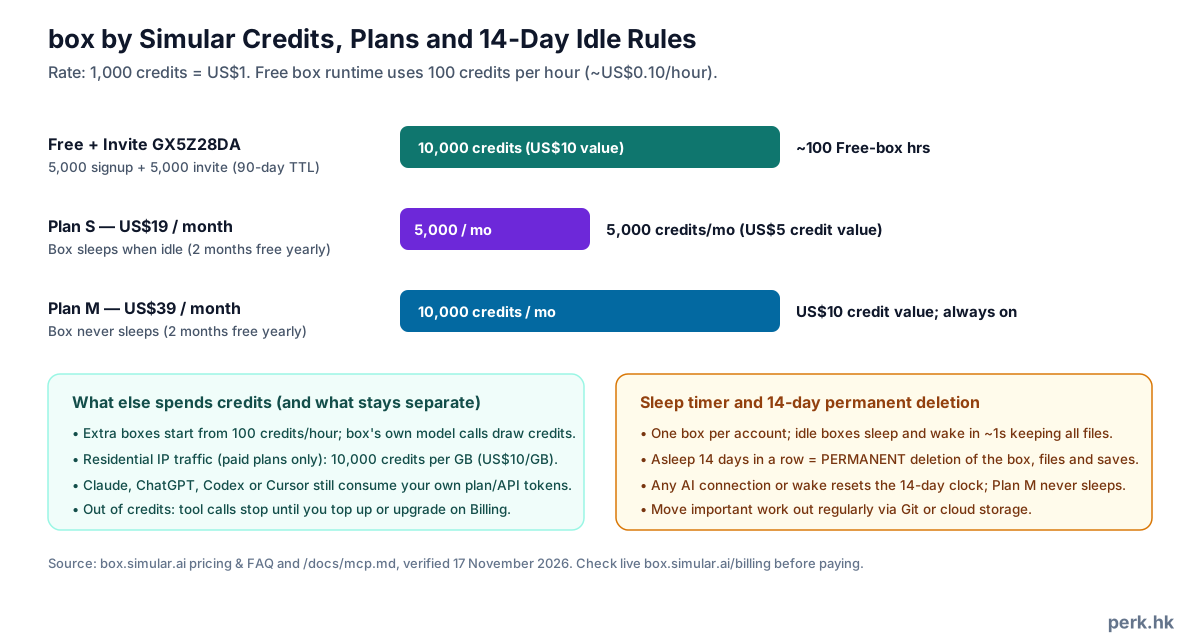
Published pricing on the box pricing page sets credits at 1,000 per US$1, with top-ups and subscriptions managed after login at Billing. A Free box consumes 100 credits/hour (US$0.10/hour), and new accounts start with 5,000 Free signup credits valid for 90 days. Applying GX5Z28DA before starting your first box stacks 5,000 invite credits (also valid 90 days) for 10,000 starting credits — US$10 value, or around 100 Free-box hours to evaluate real workloads card-free.
Upgrading becomes relevant once you move past evaluation or require continuous uptime. Plan S bills US$19/month (5,000 credits/month; sleeps when idle) while Plan M bills US$39/month (10,000 credits/month; never sleeps), with two months saved on annual plans. Keep three additional drains clear: extra boxes cost 100+ credits/hour, box's own model calls use credits, and paid-only residential IP bandwidth costs 10,000 credits/GB (US$10/GB). Host AI plans keep billing separately, and Hong Kong bank cards charging cross-border USD conversion add foreign-currency fees unless you pay with a zero-FX or USD card.
Live view, Take Control and client quirks in daily use
Automation routinely pauses on SMS OTPs, hardware 2FA checks or anti-bot gates, which is where Live View pays off: stream the box screen live, click Take Control to complete authentication manually, then hand execution back cleanly. Within our own workflow, our coding agents (Claude Code and Codex) run browser and GUI tasks on box as a shared cloud desktop while we intervene via live view whenever a site asks for login credentials or a captcha.
Plan around documented quirks in the troubleshooting guide. Claude desktop displays Live View inline in Chat and Code tabs, yet drops back to screenshots and links inside Cowork; Claude Code may grab a still screenshot right after opening Live View. In ChatGPT and Codex apps, Take Control opens inside ChatGPT's built-in browser (sign in once there) and requires hitting Refresh in app settings after box updates, while Windows Codex app sandboxing blocks writing config.toml so MCP entries go inside Settings UI instead. Crucially, Free and S boxes resume in roughly one second from sleep, yet 14 consecutive days asleep wipes every file permanently.
Secrets proxy architecture and hard limits
Putting raw tokens in prompts leaves keys exposed to conversation histories and untrusted DOM content. Saving keys inside Simular's Secrets dashboard encrypts the credential at rest and binds only a cbv_ placeholder inside container shells. Up to 8 destination domains (such as api.openai.com or *.example.com) can receive the swapped real key strictly on outbound HTTP/API requests — everything echoed locally on box stays redacted.
Remember four operational constraints in the secrets documentation: only commands executed via box's shell tool or freshly opened terminals receive injected Secrets (script_run code must run through bash -lc); one Secret covers one header or URL placement format (split dual-format APIs into two keys); agent-spawned box_create desktops never carry Secrets; and outdated boxes need an OS update from box Settings before proxy substitution works.
Headless automation, CI runs and static API tokens
For unattended workflows, the headless guide outlines signing in via OAuth once interactively before switching to claude -p with --allowedTools mcp__box (keeping the prompt immediately after -p; use mcp__claude_ai_box if added via claude.ai) or codex exec with [mcp_servers.box].default_tools_approval_mode = "approve" while locking box_delete at "prompt". Never disable your host OS sandbox globally just to approve MCP tool calls.
Where browser OAuth is impossible — such as CI pipelines or DeepSeek Harness (dsh) — generate a one-time-displayed cb_ Bearer token from your Access panel and export it via BOX_TOKEN from your secret vault. Keep plaintext keys out of committed config files and revoke expired pipeline tokens promptly.
Step-by-step: claiming 5,000 extra credits with GX5Z28DA
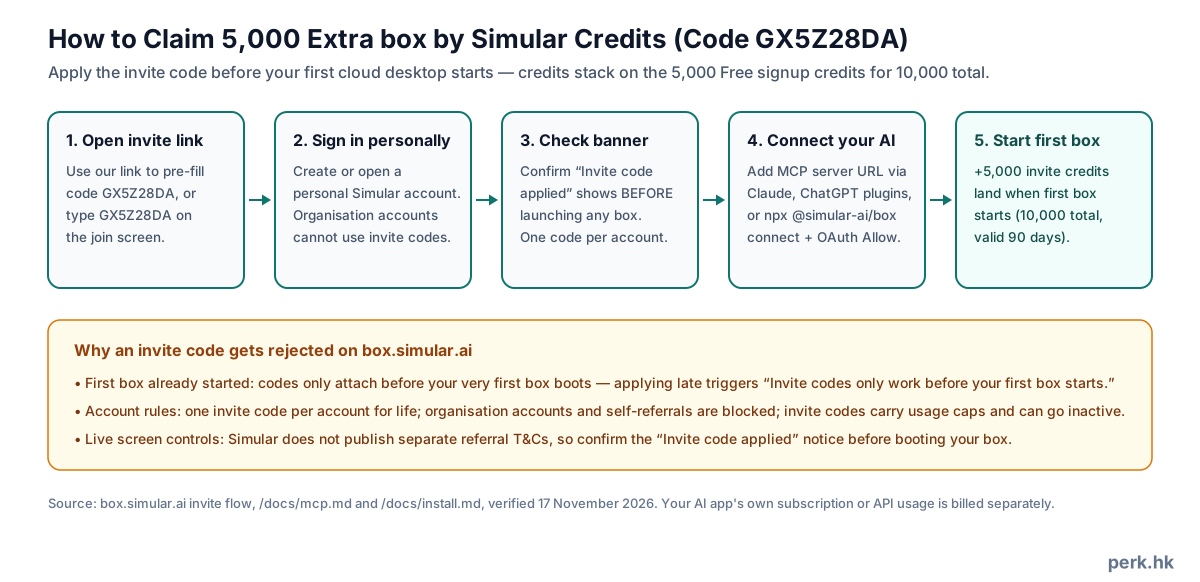
Launch sign-up through our Simular box invite link so code GX5Z28DA pre-fills cleanly (or type GX5Z28DA manually on the join screen), open or log into a personal Simular account, and confirm the "Invite code applied" confirmation banner before booting anything. Add https://mcp.box.simular.ai/mcp to one supported AI client, click Allow during OAuth approval and instruct your AI to perform its first task — starting your very first box adds 5,000 credits immediately alongside your 5,000 signup credits for 10,000 total (both valid 90 days).
Refusals follow strict referral checks: booting your first box before applying GX5Z28DA locks you out permanently, organisation accounts and self-referrals are excluded, only one invite code counts per personal account, and codes enforce active/usage caps. Because Simular publishes no dedicated referral terms or refund document, the live join confirmation and Billing page control all edge cases.
Suitability verdict and clean offboarding checklist
box fits Hong Kong users who already pay for Claude, ChatGPT or coding agents and want a disposable yet persistent cloud Ubuntu workstation for repetitive web admin, research and QA testing. Skip it if you want withdrawable HKD rewards, abandon boxes untouched for over two weeks without migrating to US$39/month Plan M, or rely solely on Google's US-locked Gemini web custom apps.
To depart cleanly without data surprises: back up scripts and downloads off the box via Git or cloud storage first (never rely on dormant retention past 14 days), purge stored tokens from Secrets, revoke connected apps and cb_ Bearer tokens under Access settings, and cancel any active S/M subscription on Billing (reach [email protected] for billing questions).
FAQ
- What does invite code GX5Z28DA give Hong Kong applicants?
- Applying GX5Z28DA on a personal account before starting your first box unlocks 5,000 extra credits (worth US$5) on top of the Free plan's 5,000 signup credits — 10,000 starting credits valid for 90 days.
- Is box by Simular open to Hong Kong accounts without a VPN or US card?
- Yes. Simular publishes no country block on box, and opening the Free plan needs no payment card. Only Google's Gemini web custom-app feature excludes Hong Kong, whereas Gemini CLI, Claude, ChatGPT Plugins, Codex and Cursor all work.
- Why did GX5Z28DA fail when I entered it?
- Most rejections occur because the account already started its first box beforehand, belongs to an organisation workspace, already used one invite code previously, or hit a capped code.
- How many runtime hours do 10,000 credits cover?
- At 1,000 credits = US$1 and 100 credits/hour on a Free box, 10,000 credits yield roughly 100 active Free-box hours within 90 days. Idle sleep pauses hourly charges, whereas extra boxes, box model calls and paid-plan residential IPs (10,000/GB) consume more.
- Should Hong Kong users expect foreign-currency charges on Plan S or Plan M?
- Yes — upgrades at US$19/month (S) and US$39/month (M) bill in US dollars on box.simular.ai/billing, so standard Hong Kong credit cards levy an FX conversion fee unless you pay with a low-FX or USD-settled card.
- Does Plan S protect files from the 14-day idle wipe?
- No. Plan S (US$19/month) still sleeps when idle, so 14 continuous sleep days permanently delete the box and files just like Free. Only Plan M (US$39/month) stays awake continuously.
- Are refunds available if I upgrade and stop early?
- Simular publishes no refund policy in its public docs, and free accounts never auto-charge without a card. Check the live checkout screen on box.simular.ai/billing before committing to a paid tier or annual cycle.