

HeyClicky Review: Is a Screen-Aware AI Assistant Worth US$20 a Month to Hong Kong Users?
A review of HeyClicky for Hong Kong residents: what the hotkey assistant and its agents actually do, Free (daily midnight reset), Pro (50× Free) and Max (250× Free) shared allowances, the real saving from 25% off the first month through this site's link, where screen and voice data go under the 10 November 2026 terms, AI providers' regional restrictions and Cantonese support, and who should and should not use it.
Last updated 17 November 2026

HeyClicky
Ad / referral links — we may earn a bonus when you sign up.
Full details & steps →Best for
Hong Kong Mac and Windows users who frequently need to learn new software or would like an assistant to handle routine tasks across Gmail, Calendar and Notion, who accept that screenshots are sent to cloud AI providers on request, and who are prepared to confirm on the daily free tier that the service works properly from Hong Kong.
HeyClicky is a voice assistant that reads the screen only when the user presses its hotkey, answers aloud in 133 languages and marks on the screen where to click; larger tasks are passed to agents that complete them inside the user's applications. Free costs nothing, connects up to 2 apps and resets a shared daily allowance at midnight — enough to judge usefulness and confirm performance from Hong Kong and in Cantonese before paying. Through this site's link, month one of Pro (50× Free usage, 100+ apps) is US$15 rather than US$20 (about HK$118 rather than HK$157), and Max (250× Free) is US$75 rather than US$100 (about HK$588 rather than HK$785); full price applies thereafter. Readers should note that all processing takes place in the cloud with OpenAI, Anthropic and Google (plus Cerebras, Groq and Deepgram for dictation), none of the reasoning providers lists Hong Kong as officially supported, there is still no SOC 2 audit, and under the 10 November 2026 Terms of Service fees are non-refundable unless the law requires otherwise. This site's recommendation is to begin on the daily Free tier and upgrade to Pro only once the shared cap proves insufficient.
Pros
- 25% off the first month of monthly Pro (US$15) or Max (US$75) through this site's link
- Free tier resetting its shared daily allowance every midnight with up to 2 apps and no card, allowing testing from Hong Kong first
- Screen is read only when triggered, and raw screenshots are never stored on HeyClicky's servers
- Speaks 133 languages, dictates in 83 languages via Google's speech model, and offers an 18-language UI
- Pro and Max connect to 100+ apps via Composio (Gmail, Google Calendar, Notion, Linear and Apple built-in apps), work in Chrome and can operate the computer once approved
- Monthly billing cancellable in one click, with published Terms of Service and Privacy Policy (updated 10 November 2026)
Watch-outs
- Discount covers month one only; full price (Pro US$20 / Max US$100) applies from month two
- Talk and agents share one percentage allowance; exhausting Pro mid-cycle requires a US$10 reset or Max
- Neither Anthropic nor OpenAI lists Hong Kong as a supported region, so service depends on HeyClicky's own routing
- All processing takes place in the cloud, with no SOC 2 or ISO 27001 certification yet
- Under the 10 November 2026 Terms, fees are non-refundable unless the law requires otherwise and unused allowances do not roll over
- Charges are in US dollars, on which Hong Kong card issuers may levy a foreign-currency fee
Current related offer
HeyClicky offer pageAd / referral links — we may earn a bonus when you sign up.
Provider
HeyClicky
HeyClicky is an AI buddy that lives on your Mac or Windows PC — press a hotkey and it sees your screen, walks you through whatever you're working on, or runs agents to do the task for you. Sign up through this referral link and get 25% off your first month of Pro ($20/month) or Max ($100/month). The Free tier resets shared daily usage every midnight with up to 2 connected apps and costs nothing; Pro includes 50× Free usage, 100+ apps, unlimited dictation and $10 usage resets, and Max includes 250× Free usage.
Requirement: A paid Pro ($20/month) or Max ($100/month) subscription — the 25% discount applies to the first month
Easy5 minutes to sign up via the referral linkPayout 25% off applied to your first month when you subscribe to Pro or Max
Verified 17 November 2026
Full claim instructions are on the HeyClicky offer page.
Product overview and developer
HeyClicky is an AI assistant residing on the desktop. When the user presses the hotkey and speaks, it captures the screen, interprets what the user is viewing, answers aloud and marks on the screen where to click; where the user requests work to be done, it launches an agent inside the relevant applications. HeyClicky now states that it has more than 80,000 users.
The developer is Humansongs, Inc., a Delaware corporation in San Francisco from Y Combinator's Spring 2026 batch. The product supports Macs running macOS Sonoma 14.2 or later and, since version 1.1.1 released on 23 October 2026, Windows 10 or later. It is distributed from heyclicky.com rather than an app store: a disk image for Mac and a signed installer for Windows.
Everyday use
The core function is conversation: the user presses the hotkey and asks how to perform a task in whichever application is open, and HeyClicky guides step by step in 2D or 3D while keeping those drawings in the chat for replay. Speech covers 133 languages, dictation handles 83 languages via Google's newest speech model with automatic mid-sentence switching (added 30 October 2026), and since version 1.1.4 on 16 November 2026 the app UI itself comes in 18 languages including English and Chinese.
Since September 2026 the platform has also offered Clickys and background jobs: persistent agents with their own names, memory and files to which users assign repeating routines by voice. It reads whole documents, remembers style preferences, and lets users follow up by typing in chat or holding voice keys.
Agents, integrations and computer control
Saying "heyclicky agent" passes a task to an agent that displays its plan and result under the notch at the top of the screen; long jobs retain history overnight and retry automatically through temporary AI outages. Free connects up to 2 apps while Pro and Max unlock 100+ connected apps via Composio (Gmail, Google Calendar, Drive and Sheets, Notion, Linear, Apple Notes, Calendar and Reminders, Spotify, Stripe and Meta Ads) plus custom MCP connectors; Reddit and Monday remain withdrawn. With the Chrome Web Store extension, agents work on signed-in websites and upload files with user approval, leaving password, verification-code and card fields untouched.
With user approval, agents can operate the Mac. Moving the mouse, speaking or pressing Escape restores control immediately, and when a login or payment step appears, the agent pauses and presents an Open page button for the user to finish. Where uncertain, agents ask rather than guess. Connect only accounts you would entrust to a careful temporary member of staff.
The Free, Pro and Max plans compared
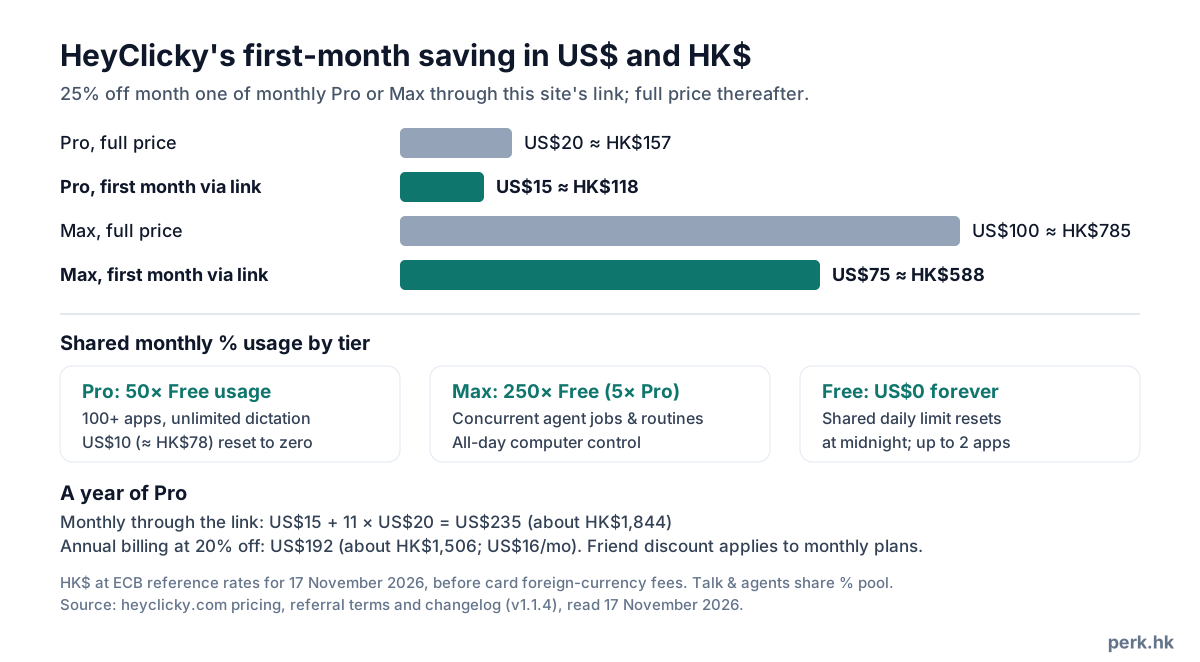
From November 2026, HeyClicky moved every tier to a single shared monthly percentage allowance for talk and agents, shown in the notch usage ring; agents draw faster than quick questions, and warnings appear before exhaustion. Free (US$0 forever, no card) provides a limited shared daily allowance resetting every midnight — voice answers, a few drawings and agents daily, and up to 2 connected apps. Pro costs US$20 a month (about HK$157) for 50× Free usage, drawings on request, full walkthroughs, research/write/build agents, 100+ apps, unlimited dictation and US$10 (about HK$78) one-off usage resets keeping your normal billing date. Max costs US$100 a month (about HK$785) for 250× Free usage (5× Pro), concurrent agent jobs, unlimited routines and all-day computer control.
Annual billing offers a 20% reduction: US$16 a month for Pro (US$192 a year, about HK$1,506) or US$80 a month for Max (US$960 a year, about HK$7,532). Team billing with Pro or Max seats is also offered, and students presenting a school email or student card receive 50% off their first month of Pro. Pre-16 November subscribers remain on legacy plans unless they email [email protected] to switch. All plans remain month-to-month without lock-in.
The discount through this site's link, and disclosure
Users should open this site's link before creating an account; a monthly Pro or Max subscription then receives 25% off its first month. The link page names this site as the referrer and displays the discount. Attribution is stored in a cookie for up to 60 days; emailing yourself the download link also carries the referral from phone to computer for 60 days. Clearing cookies or switching browsers before sign-up may lose it.
Each account may have one referrer set before its first subscription; team subscriptions, self-referrals and loops between accounts do not qualify. This is this site's referral link.
Cost calculation
Through this site's link, the first month of Pro costs US$15 rather than US$20, saving US$5 (about HK$39); Max month one costs US$75 rather than US$100, saving US$25 (about HK$196). Hong Kong dollar equivalents use European Central Bank reference rates for 17 November 2026 before issuer foreign-currency fees. Purchasing one US$10 reset (about HK$78) early in month one brings Pro month one to US$25 (about HK$196) or later months to US$30 (about HK$235) — still well below Max (US$100, about HK$785), unless Max's 5× capacity and concurrent runs are needed.
Over a year, Pro paid monthly through this site's link totals US$235 (about HK$1,844): US$15 for month one and US$20 for the next eleven. Annual billing at 20% off comes to US$192 a year (about HK$1,506, or US$16 a month), saving US$43 (about HK$337) where a full year's use is certain; the friend discount applies to monthly plans. Most readers should verify daily utility on the midnight-resetting Free tier before subscribing.
Handling of screen and voice data
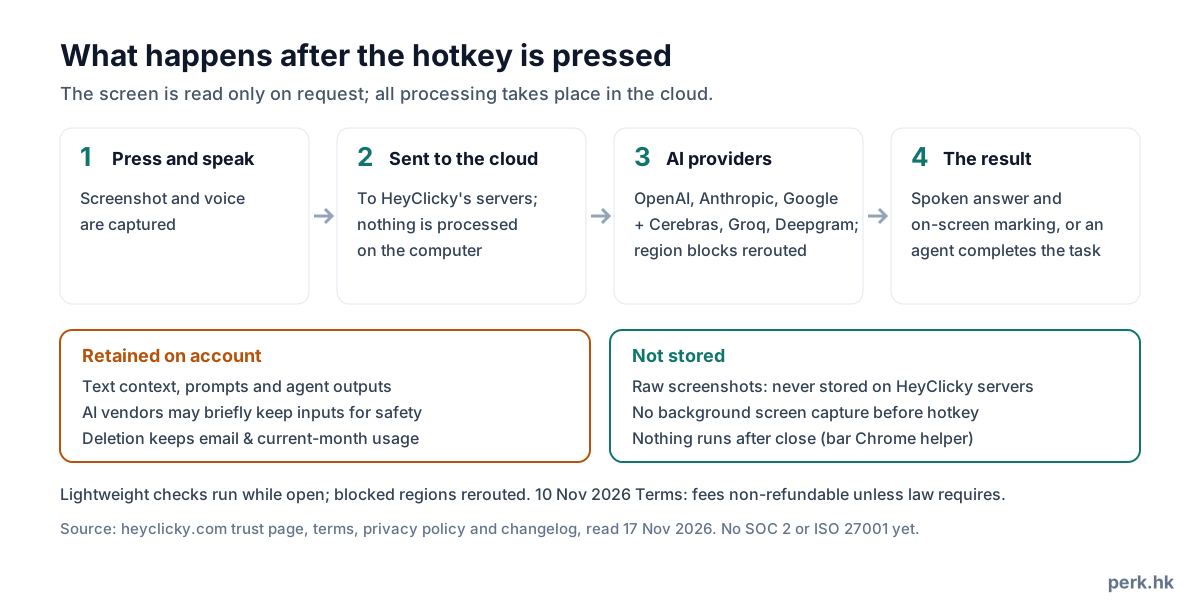
HeyClicky reads the screen only when the user presses its hotkey. While open, it runs only lightweight checks — detecting active calls (version 1.1.4 stopped FaceTime alone counting as a call) and scheduled routines — and quitting leaves only a small Chrome helper if the extension was installed. Once triggered, screenshots and voice pass through HeyClicky's servers (Cloudflare, Supabase and Vercel) to its AI providers: OpenAI, Anthropic and Google for reasoning, plus Cerebras, Groq and Deepgram for dictation; nothing processes locally. Search queries reach Exa, Brave, Google or Wikipedia; Composio holds app credentials; Stripe, Loops, PostHog and Sentry handle billing, email, analytics and crashes without seeing the screen; website ad pixels use Meta, Google, LinkedIn and X.
HeyClicky states raw screenshots are never stored on its servers, though AI providers may keep them briefly for processing and safety checks. Text summaries/context, prompts and agent outputs stay on account, and neither HeyClicky nor its AI providers train models on user data. Deleting an account via Settings → Account → Delete Account or [email protected] clears connected apps and account data while retaining email, any leaving reason, current-month usage (to prevent resetting free limits) and legally required payment records. Without SOC 2 or ISO 27001 certification, avoid pressing the hotkey with online banking, medical or confidential client records visible.
Notes for Hong Kong users: AI providers, regional restrictions and language
HeyClicky offers no choice of model. Clickys run on OpenAI's GPT-6 Luna and GPT-6 Sol; realtime voice uses a router spanning OpenAI, Anthropic and Google, sending simple questions to fast models and harder ones to frontier models; since 30 October 2026 dictation uses Google's newest speech model. Neither Anthropic nor OpenAI lists Hong Kong among officially supported regions; HeyClicky invokes them from its own servers and reroutes blocked requests. Because HeyClicky publishes no list of supported countries, this arrangement could change at any time.
As for language, HeyClicky states speech covers 133 languages, dictation covers 83 languages with mid-sentence switching, and since 16 November 2026 its UI includes "Chinese" among 18 languages — yet it does not specify Cantonese support. Hong Kong readers should test Cantonese prompts and dictation on the Free tier before paying.
Payment, cancellation and refunds
Prices are in US dollars, on which Hong Kong issuers may apply foreign-currency charges. Cancelling takes one click in Settings → Billing and stops future renewals until cycle end; under the Terms of Service and Privacy Policy updated 10 November 2026 (Delaware law; 13+, or guardian consent under 18), section 6 stipulates fees are non-refundable unless the law requires otherwise and unused allowances do not roll over. A card chargeback remains your fallback if a billing error occurs.
Accounts can be deleted in Settings → Account → Delete Account or via [email protected], retaining only legally required records, email, leaving reason and current-month usage. With the developer US-based and no Hong Kong entity, monthly billing is wiser than annual prepayment unless a full year's use is settled.
User reviews
Distributed directly, HeyClicky carries no app-store rating; when checked on 24 October 2026, it had no Trustpilot page and its Product Hunt listing carried no reviews with 182 followers, where comments asked for direct task execution rather than guidance alone (now supported) and raised unease over screen-viewing AI.
Its November 2026 changelog (through version 1.1.4 of 16 November 2026) documents active weekly fixes: automatic retries and status notices after the 9 November AI outage, Chrome Web Store file uploads, FaceTime call detection and MacBook Pro camera-island fixes, plus Windows installer and Bluetooth chime refinements. Consult the changelog first whenever behaviour shifts.
Who should and should not use it
Readers who regularly learn new software, want an assistant that acts across Gmail, Calendar, Notion or Chrome upon approval, and accept on-demand screenshots going to cloud AI providers will find it practical. Confirm Hong Kong routing and language fit on the midnight-resetting Free tier before upgrading through this site's link.
Avoid it if your screen regularly displays confidential client, medical or financial data, if you require SOC 2 or ISO 27001 certification, or if you need only a standard chat window.
FAQ
- What discount does this site's link provide?
- 25% off the first month of monthly Pro (US$15, about HK$118) or Max (US$75, about HK$588). Open the link before creating the account.
- Can HeyClicky be used in Hong Kong?
- HeyClicky publishes no list of supported countries. Its AI providers do not support Hong Kong, but HeyClicky reroutes region-blocked requests; test on Free first.
- Does HeyClicky support Cantonese?
- Speech supports 133 languages, dictation 83 languages and the UI includes "Chinese", without naming Cantonese explicitly. Test Cantonese on Free before paying.
- Is there a free tier?
- Yes. Free needs no card, connects up to 2 apps and grants a limited shared daily allowance (talk, a few drawings and agents) resetting at midnight.
- How do talk and agents share usage?
- Since November 2026 both share one monthly percentage allowance, with agents using more than quick questions. Pro offers 50× Free usage plus US$10 resets; Max offers 250× Free plus concurrent agents.
- Can it be used on Windows?
- Yes, on Windows 10 or later since 23 October 2026; Macs require macOS Sonoma 14.2 or later.
- Are screenshots retained?
- HeyClicky states raw screenshots are never stored on its servers (AI providers may keep them briefly for processing and safety), while text context, prompts and agent outputs stay until deleted; current-month usage stays on deletion to stop free-tier resets.
- Can the subscription be cancelled for a refund?
- Cancelling is one click and stops future billing until cycle end. Under the 10 November 2026 Terms, fees are non-refundable unless the law requires otherwise.