
How to Verify a Bitcoin Wallet Address for HashKey and OSL Withdrawals
By Perk editor· Last verified: 21 November 2026 (HKT)· About 9 min read
Hong Kong SFC-licensed exchanges require ownership proof before whitelisting a self-custody BTC address. Covers SFC rules, BIP-322 signing, step-by-step browser instructions, test results and common failure causes.

Ad / referral links — we may earn a bonus when you sign up.
Investing involves risk. Prices can go down as well as up and may become worthless. This is not investment advice.
Why HashKey and OSL Require Wallet Ownership Verification
When Hong Kong residents withdraw Bitcoin from a licensed virtual asset trading platform (VATP) to a personal self-custody wallet (an unhosted wallet), the exchange asks them to whitelist and verify the destination address first. This step is not an arbitrary hurdle invented by individual platforms; it reflects Hong Kong Securities and Futures Commission (SFC) regulatory requirements.
Under the SFC Guideline on Anti-Money Laundering and Counter-Financing of Terrorism (For Licensed Corporations and SFC-licensed Virtual Asset Service Providers, effective 1 June 2023), paragraph 12.10.5 strongly encourages licensed firms to whitelist wallet addresses owned or controlled by clients. Paragraph 12.10.6 and footnote 141 state that transfers involving unhosted wallets require appropriate confirmation of customer ownership or control, expressly citing a micropayment test or a message signing test. Paragraphs 12.14.2 and 12.14.3 further require platforms to collect and record originator and recipient details (with certain originator identification details exempt for transfers under HK$8,000) and to transact only with unhosted wallets assessed to be reliable.
In practice, the OSL Support Center (updated 8 October 2026) states that the platform supports only Personal Wallets where you control the private keys (among external exchanges, only PantherTrade is currently supported). Its automatic WalletConnect flow covers only specific assets such as ETH and SOL, excluding Bitcoin. For BTC on OSL, you must use manual verification (App: Assets → Deposit, or Web: Wallet Icon → Wallet Address Management → Add Wallet Address, complete 2FA, then proceed to verification) and choose between Micro Deposit Verification and Signature Verification. Individual retail users on OSL HK are also subject to a 24-hour protection period on newly added and verified withdrawal addresses.
For HashKey Exchange, its online help centre was not reachable for automated review on the date checked, so the HashKey details below reflect our own live testing on 21 November 2026 and live on-screen HashKey prompts always prevail. In our test, HashKey generated a declaration string containing the date, target BTC address and a rotating Serial Code, requiring a valid signature pasted back on the same verification screen.
What a Bitcoin Message Signature Is and Why It Cannot Move Funds
A Bitcoin message signature is a cryptographic proof: your wallet uses the private key for a specific address to produce a Base64 string over an exact challenge text supplied by the exchange. Anyone with your public address can verify that the private key holder signed that exact text. It does not construct or broadcast a Bitcoin transaction, so it cannot move funds and incurs zero miner fee.
As documented in BIP-322 (Generic Signed Message Format), the original Bitcoin message signing format worked only for legacy P2PKH (1…) addresses. BIP-322 generalises message signing across modern script types including Native SegWit (bc1q…) and Taproot (bc1p…). Although BIP-322 uses a structure resembling a Bitcoin transaction for interoperability, the specification intentionally includes an invalid input so it can never be spent on any real Bitcoin network.
Many Hong Kong users stall at this step because OKX Wallet and MetaMask do not offer a standalone Bitcoin message-signing box inside their extension popup — they expose signing only through JavaScript APIs for web pages. Our Wallet Message Signer bridges that gap: it checks that the connected wallet address matches the exchange target before signing, verifies the output locally in your browser, sends nothing over the network, and never asks for a seed phrase.
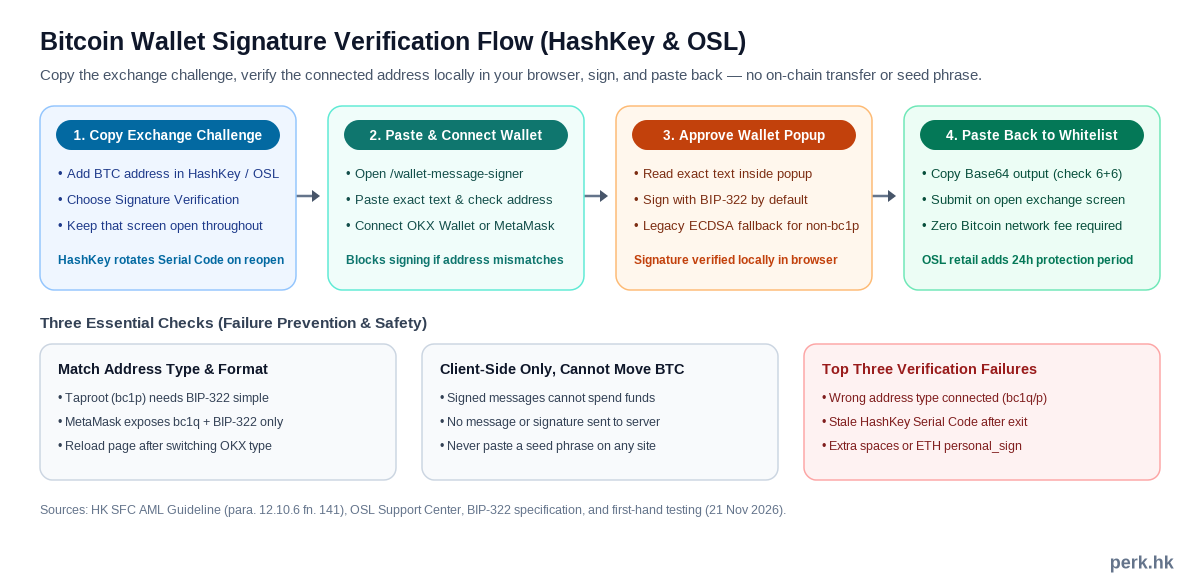
Step-by-Step Verification With the Signer Tool
- Start signature verification on the exchange and keep that screen open: Add your personal BTC withdrawal address in HashKey or OSL, choose Signature Verification, and copy the full challenge string. Do not close, reload or navigate away from that screen — HashKey issues a fresh Serial Code every time the page is reopened, invalidating the previous string.
- Open the signer tool and paste verbatim: In a separate desktop browser tab, open Wallet Message Signer, paste the exact challenge text without altering a single character, and confirm the expected BTC address matches the exchange screen (where the string embeds the address, as on HashKey, the page parses it for comparison).
- Connect your desktop wallet extension and check the address: Connect OKX Wallet or MetaMask. The tool compares the wallet's active Bitcoin address against the target address and refuses to sign on mismatch, prompting you to switch account or address type first.
- Review the popup text and sign: Click sign (BIP-322 by default) and read the exact text inside the wallet extension popup before approving. Only if you are signing for a 1…, 3… or bc1q… address and the exchange rejects BIP-322 should you try the legacy ECDSA fallback button.
- Confirm local verification and copy the signature: The page checks the signature locally against the address and message. Once verified, copy the Base64 output; if you are transferring the string to paste into a phone app, check the first 6 and last 6 characters to make sure nothing was clipped or padded.
- Paste back to the exchange and note any cooling-off window: Return to the still-open exchange verification screen, paste the signature and submit. On OSL HK, individual retail accounts have a 24-hour protection period after adding and verifying a new withdrawal address.
First-Hand Test Results (21 November 2026)
| Exchange | Address Type & Wallet | Signature Format | Observed Outcome |
|---|---|---|---|
| HashKey | Taproot (bc1p…, OKX Wallet) | BIP-322 simple | Accepted: passed verification cleanly; confirmed working route |
| HashKey | Taproot (bc1p…, OKX Wallet) | BIP-322 and ECDSA (earlier serial) | Rejected: cause not confirmed; most likely the Serial Code had changed after the page was reopened |
| HashKey | Native SegWit (bc1q…, OKX Wallet) | ECDSA (headers 31–34 and 39–42) | Rejected (stale serial): submitted against an expired Serial Code; retry with a fresh serial has not been confirmed |
| OSL | Native SegWit (bc1q…, MetaMask) | BIP-322 simple | Unconfirmed: MetaMask produces a valid BIP-322 signature, but OSL backend acceptance is not yet confirmed |
| OSL | Taproot (bc1p…, OKX Wallet) | ECDSA | Rejected (wrong address): connected wallet address differed from the address OSL expected |
Tested on 21 November 2026. Exchange verification backends and supported signature formats may change without notice; live prompts prevail.
Five Common Causes of Signature Verification Failure
- Number one cause — wrong address or address type connected: One seed phrase derives multiple Bitcoin address types — Taproot (bc1p…), Native SegWit (bc1q…), Nested SegWit (3…) and Legacy (1…) — and browser wallets connect whichever type is currently active. Our OSL test failed for exactly this reason. Always verify the connected address before signing; in OKX Wallet, switching address type requires reloading the signer page.
- Expired challenge text: HashKey regenerates its Serial Code every time the verification page is reopened. Leaving the screen, letting it time out or refreshing it invalidates any signature generated from the earlier code even if the cryptography is sound.
- Message not identical byte-for-byte: One extra space, trailing newline or missing character breaks verification. HashKey's tested string contains no spaces after commas: It is hereby declared,on 2026/11/21,that I/we own the address <addr>.Serial Code:781240. Copy and paste verbatim without reformatting.
- Signature format mismatch (BIP-322 vs legacy ECDSA): Taproot (bc1p…) addresses require BIP-322 (bip322-simple), which HashKey accepted in our test. Legacy ECDSA (Electrum / Bitcoin Signed Message) serves only as a fallback for 1…, 3… and bc1q… addresses. Even within ECDSA, byte 0 encodes an address-type header (31–34 for P2PKH/Electrum style, 35–38 for P2SH-SegWit, 39–42 for Native SegWit/Trezor style), so start with BIP-322 first.
- Using Ethereum personal_sign: Ethereum signing methods sign with your EVM (0x…) private key rather than your Bitcoin key, producing an output that can never verify against a BTC address.
Supported Wallets and Bitcoin Address Types
| Wallet / Environment | API & Address Types | Signature Formats | Test Status & Practical Notes |
|---|---|---|---|
| OKX Wallet (desktop browser extension) | Injects window.okxwallet.bitcoin; supports Taproot (bc1p), Native SegWit (bc1q), 3… and 1…, returning whichever type is currently selected | Supports both bip322-simple and ecdsa (OKX docs note bip322-simple requires modern extension / app 6.51.0+) | Taproot (bc1p) + BIP-322 confirmed accepted on HashKey; reload the page after changing address type in OKX |
| MetaMask (desktop browser extension) | Registers via Wallet Standard (bitcoin:connect, bitcoin:signMessage) with no window global; MetaMask docs note Native SegWit (bc1q) is the default derivation path | Produces BIP-322 signatures only (no legacy ECDSA) | Generates locally verifiable BIP-322 signatures; OSL acceptance remains unconfirmed |
| Other Wallet Standard BTC extensions (e.g. Xverse, Phantom) | Discovered through the same Wallet Standard interface as MetaMask | Depends on each extension's implementation (typically BIP-322) | Not tested by us; check the local browser verification badge before pasting |
| Mobile wallet apps & mobile browsers | Standard mobile browsers do not inject desktop extension APIs; in-app dapp browsers (such as OKX app) are untested for this flow | Not applicable / untested | Sign on a desktop browser extension; if pasting onto a phone, compare the first 6 and last 6 characters |
MetaMask's documentation also notes that imported Bitcoin accounts must currently use Native SegWit derivation and be restored via a 12- or 24-word Secret Recovery Phrase rather than a single private key.
Four Safety Rules Before You Sign
- Never enter a seed phrase or private key on any website: No legitimate verification tool or exchange ever asks for your 12- or 24-word Secret Recovery Phrase. Genuine signing happens strictly inside your local wallet extension popup.
- Read the exact message in the wallet popup: While a plain Bitcoin message signature cannot transfer coins, always check that the popup text matches the exchange ownership declaration (date, your address and serial code) rather than an unfamiliar statement.
- Keep signing client-side: Our Wallet Message Signer makes zero network requests with your challenge text or signature; signing happens inside your wallet extension and verification runs locally in your browser.
- Double-check the mainnet address before withdrawing: Once whitelisted, verify the destination address and Bitcoin mainnet network before sending funds, as on-chain transfers are irreversible. Factor in OSL HK's 24-hour protection period for retail accounts when timing a withdrawal.
Comparing HashKey and OSL Before Opening or Withdrawing
If you are still comparing account opening requirements, withdrawal fees, supported tokens or custody terms across Hong Kong's licensed venues, read our HashKey Exchange review and OSL review, or check the HashKey referral offer page and OSL referral offer page for current account terms and eligibility.
HashKey and OSL Sign-up Offers

Provider
HashKey
Register for HashKey Exchange with invite code fgIxIl. The Invite Friends screen for this code shows the invited friend receives HK$640 as a welcome bonus plus HK$200 as invite rewards (HK$840 total), claimed manually in Reward Center after full KYC. HashKey country eligibility follows live provider terms. Crypto can fall to zero.
Requirement: No deposit amount is set for the friend rewards; KYC requires a bank transfer of at least HK$10,000 (or USD equivalent) from your own account, or opening in person at HashKey's Hong Kong office, plus a risk assessment and successful account opening
Medium10-20 minutes plus full identity verificationPayout After qualifying KYC; rewards must be claimed manually in Reward Center / Referral
Verified 24 October 2026

Provider
OSL

Open an OSL account through this invite link; invite code yE48X is attached. OSL Exchange is run by OSL Digital Securities Limited, an SFC-licensed virtual asset trading platform (CE BPJ213) in HKEX-listed OSL Group (0863). Retail clients pay 0% as maker and 0.05% as taker on Pro Trade, and Hong Kong and US dollar deposits and withdrawals are free. Prices of virtual assets can be highly volatile; this is not investment advice.
Requirement: No deposit target for the invite; account verification needs a deposit of at least HK$10,000 from a bank account in your own name
Medium15-20 minutes to register and verify, plus the HK$10,000 verification depositPayout No sign-up reward to pay out: OSL's welcome and invite campaigns ended on 31 October 2026
Verified 22 November 2026
FAQ
- Can signing a Bitcoin verification message move BTC out of my wallet?
- No. Message signing uses your private key to sign plain text and does not create or broadcast a valid on-chain transaction. Even so, read the exact text inside the wallet popup and never type your seed phrase into any website.
- Why is there no Sign Message button inside OKX Wallet or MetaMask?
- Neither desktop extension includes a manual Bitcoin message-signing screen in its popup UI; both expose Bitcoin signing only through browser JavaScript APIs (window.okxwallet.bitcoin for OKX, Wallet Standard for MetaMask). A browser tool page invokes that API so the wallet popup can sign.
- HashKey rejected my signature — what should I check first?
- Check three things first: whether the connected wallet address type (for example bc1p vs bc1q) matches the address shown on HashKey, whether reopening the page rotated the Serial Code, and whether the text was copied verbatim with no spaces after commas and signed with BIP-322 for Taproot.
- Can I use WalletConnect on OSL to verify a Bitcoin address automatically?
- No. According to the OSL Support Center (updated 8 October 2026), automatic WalletConnect verification covers only specific assets such as ETH and SOL. Bitcoin addresses require manual verification via either Micro Deposit Verification or Signature Verification.
- Can I verify a HashKey or OSL address if I only use MetaMask?
- MetaMask desktop extension defaults to Native SegWit (bc1q) addresses and signs using BIP-322 via Wallet Standard. However, we have not yet confirmed whether OSL or HashKey accepts MetaMask's bc1q BIP-322 signature; if rejected, use the exchange's micro-deposit verification option or OKX Wallet Taproot (bc1p) with BIP-322, which passed on HashKey.
- Can I complete Bitcoin signature verification on a mobile phone?
- Regular mobile browsers do not inject desktop wallet extension APIs, and mobile in-app dapp browsers have not been tested by us for this flow. Sign on a desktop browser extension instead, then verify the first 6 and last 6 characters if you paste the signature into your phone app.